
Quotes & Invoicing
Send a professional quote in minutes
Build quotes using your own pricing for every service you offer, add photos, and let clients approve online — no printing, no back-and-forth phone calls.
- Your own pricing per service category, not a generic template
- Client approves and e-signs online
- One click turns an accepted quote into an invoice
- Amend a sent invoice and the earlier one is kept — never a question about what was agreed
Your first 14 days are free, and nothing is charged until they are up.

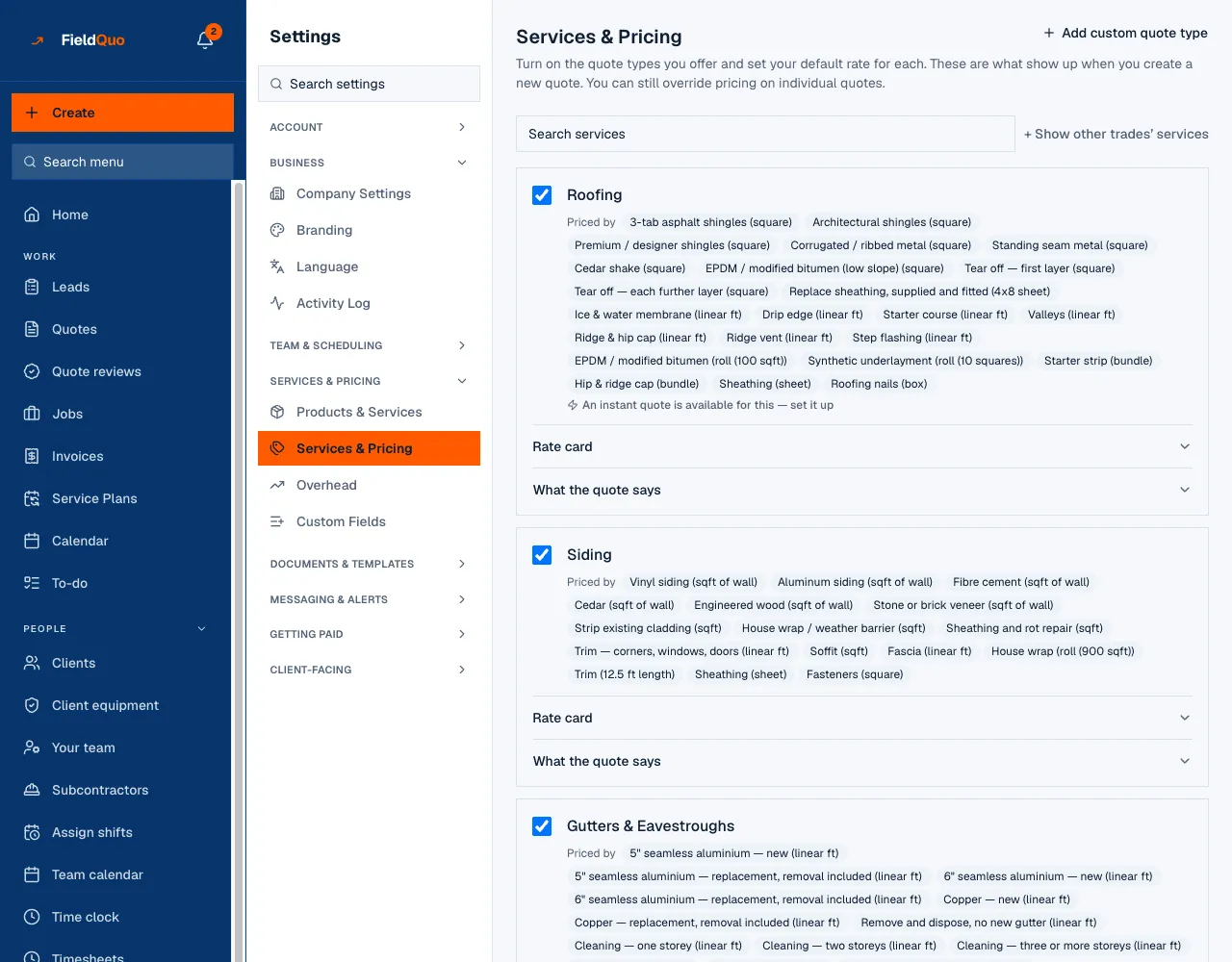
Your services and your rates, set once
Every service you offer has its own rate card — per square, per linear foot, per hour, whatever the trade prices by. Set it once and it fills every quote. Your product list imports from a spreadsheet, so nothing has to be retyped.
- A rate card per service, in the units your trade actually uses
- Products and services imported from a CSV, not retyped
- Material costs and recipes behind the price, never shown to the client
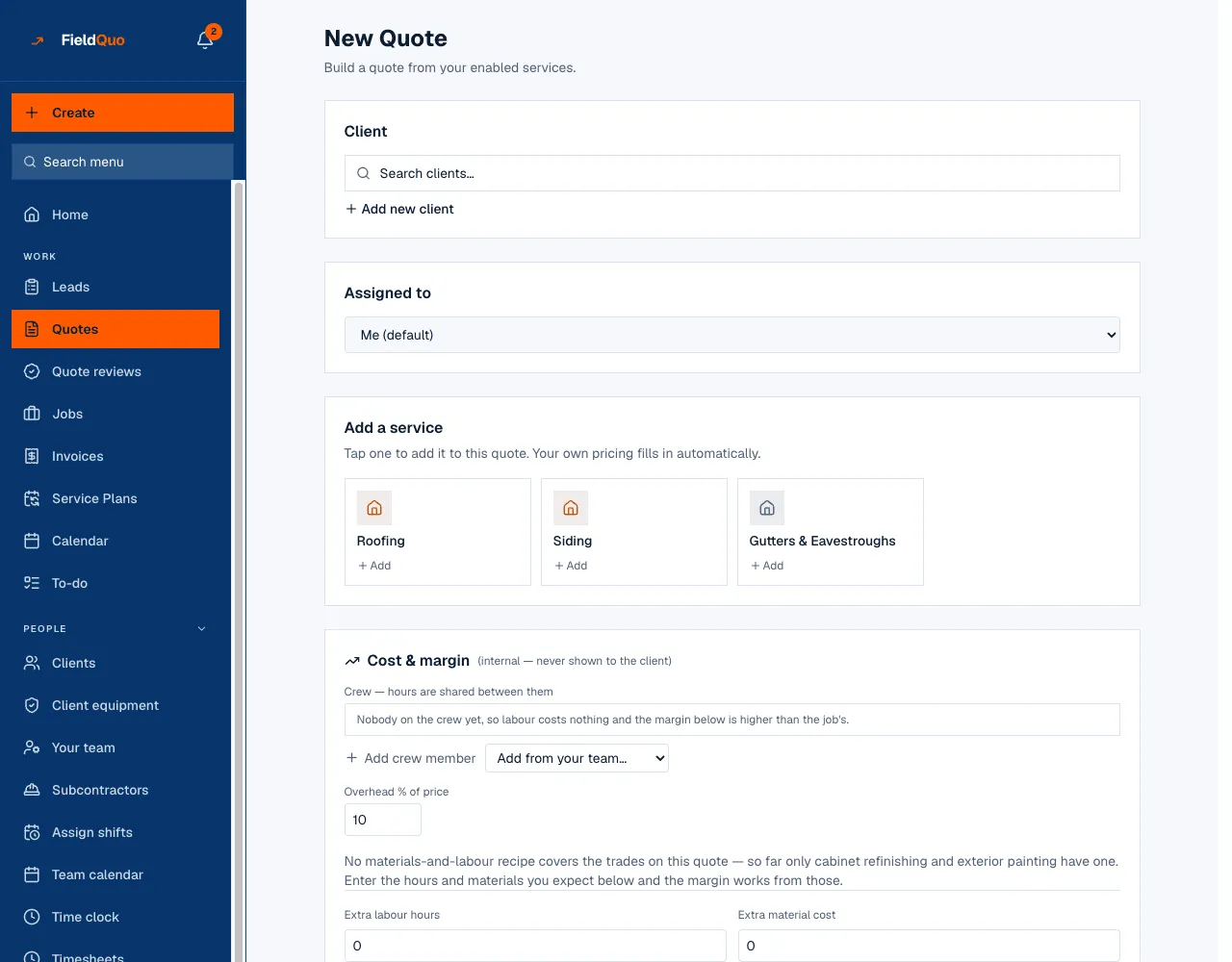
Build the quote at the house
Tap a service and your own pricing fills in. Group the lines by room or by scope, attach the photos the client sent, and keep your cost and margin on a panel the client never sees.
- Group lines by room or scope so the quote reads the way the job goes
- Photos and videos from the client stay on the quote and carry to the invoice
- Cost & margin worked out beside the price — crew hours, materials, overhead
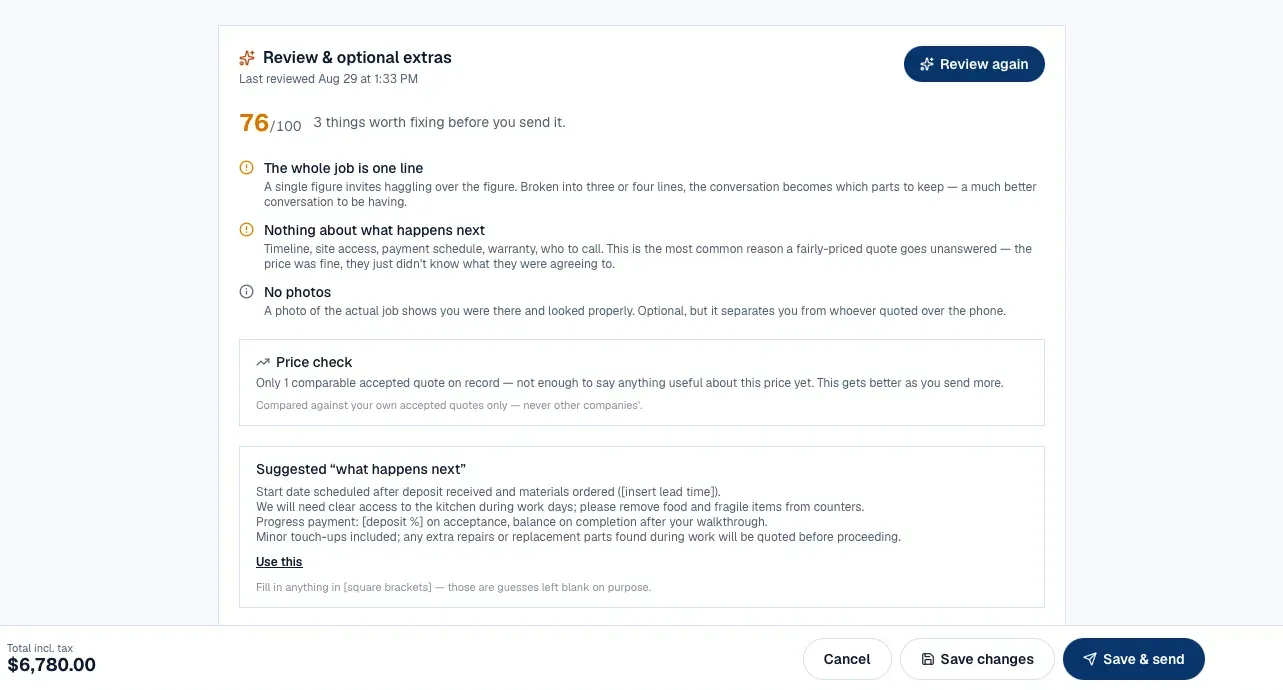
A review before you send, and add-ons the client can tick
Before a quote goes out, FieldQuo AI reads it: what you forgot to mention, how the price sits against the quotes you have already won, and wording that is clearer. Suggested add-ons are priced from your own history and land as optional extras the client ticks on the approval page.
- What is missing, how the price compares, what to reword
- Compared against your own accepted quotes only — never another company's
- Add-ons are priced on your side; the client only chooses which to accept

The client approves and signs from their phone
The quote arrives in an email from your address, with your logo and your colour, and opens on a page that carries your name. The client picks any extras, signs, and the job is on. What they saw at the moment they signed is kept with the signature.
- Your logo, your colour, your name — nothing on it says FieldQuo
- Signature recorded with the exact document the client saw
- A quote keeps the language it was written in; a signed document never changes its words
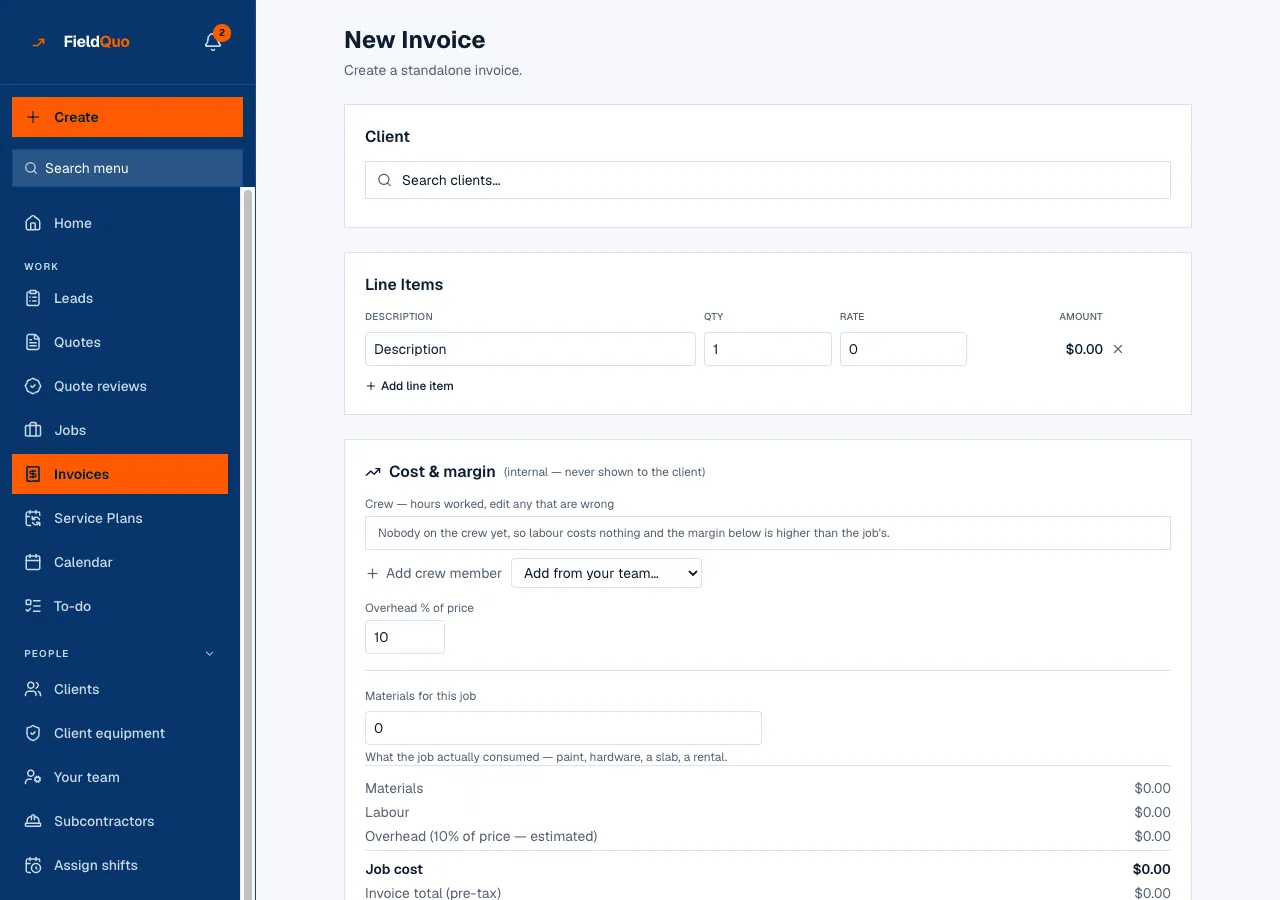
One click to invoice, paid from the phone
An approved quote becomes an invoice that looks like the quote, because it is built from it. Ask for a deposit, split a big job into stages, and let the client pay by card or bank debit — the money settles into your own account, never ours.
- Amend an issued invoice and the earlier version is kept
- Deposits and stage payments, requested on the schedule you set
- Card, or bank debit in Canada and the US, paid straight to your account
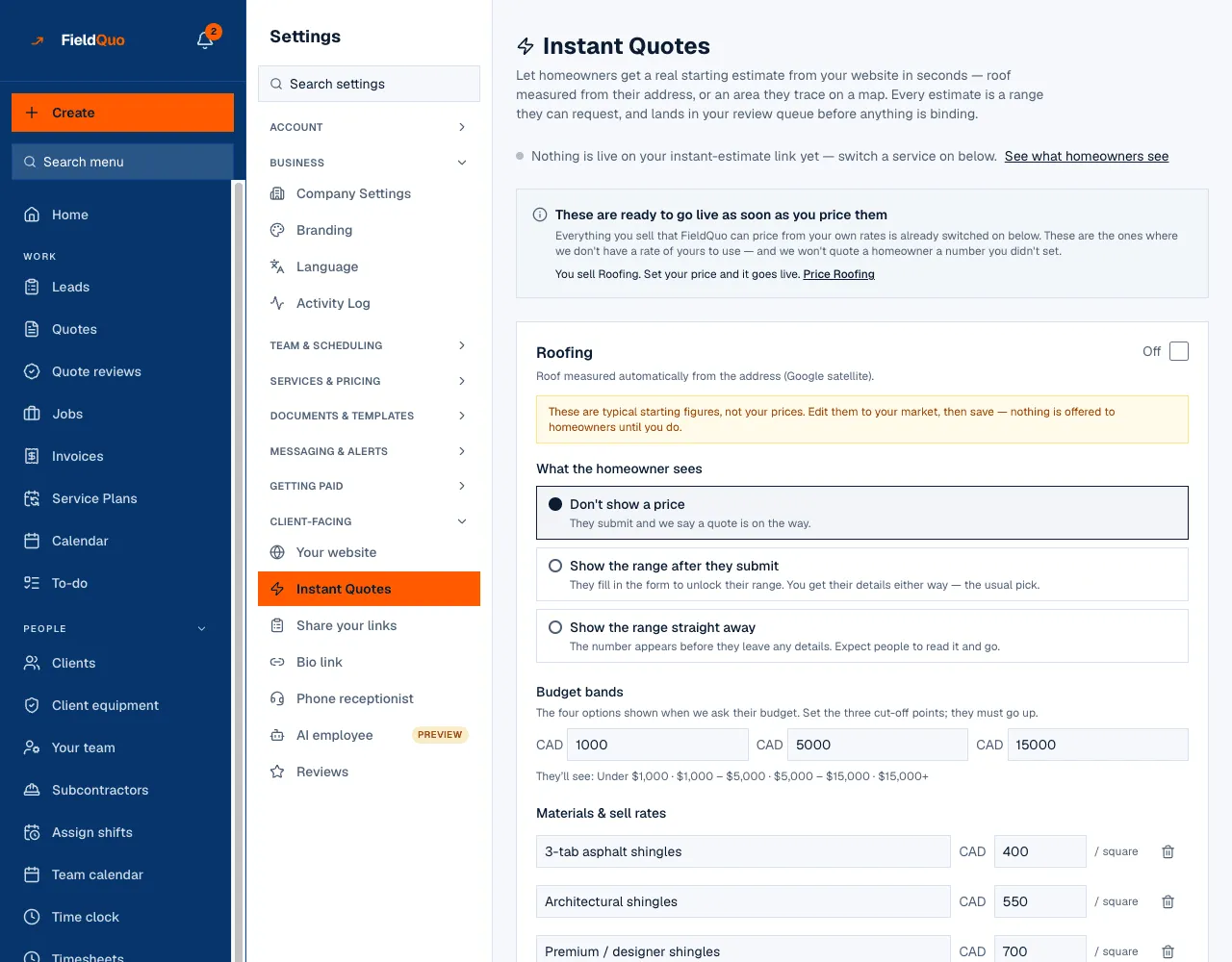
An instant estimate on your website
A visitor answers a few questions — or traces the roof from the address — and gets a price range from rates you set. It lands in your review queue before anything is binding, and your rate card itself is never published.
- Show a range straight away, after they submit, or not at all — your choice per service
- Every estimate waits in Estimate Reviews for you to confirm or adjust
- A self-quote form where the homeowner describes the job and uploads photos
Everything under Quotes & Invoicing
Every capability listed here is in the product today. Where one stops short, it says so.
Quotes
Build a quote from your own rates, group it by room or scope, and add photos.
Your price book
Your services and rates in one place, imported from a spreadsheet instead of retyped.
Material costs and recipes
What a litre of paint or a sheet of ply costs you, and how much of it a job of this size eats.
Send a quote by email
One button emails the quote from your address, with the PDF attached, in the client's language.
Quote PDF in your colours
A PDF that carries your logo and brand colour — nothing on it says FieldQuo.
Client approves and signs online
The client opens a link, picks any extras, signs, and the job is on — no printing, no phone tag.
AI quote review
Before you send it: what you forgot, how the price sits against the ones you have won, and clearer wording.
Suggested add-ons
Optional extras at the bottom of the quote, priced from your own history, that the client can tick.
Automatic follow-ups
A quote that goes quiet gets chased on your schedule, in your words, without you remembering.
Good, better, best options
Send one job at three prices and let the client pick the one they want.
Where this stops: The pricing behind it is built and the three quotes can be produced behind the scenes, but there is no screen for it yet — so today you would be building all three yourself. Ask us before you buy on this one.
Instant online estimate
A visitor answers a few questions and gets a price range on the spot, from rates you set.
Clients can price their own job
A public form where a homeowner describes the work and uploads photos; it arrives as a started quote.
Quote drafted from the call
What the caller described comes back as a draft quote you open, correct and send.
Kitchen and cabinet designer
Draw the run, pick the finishes, and the cabinet prices and the floor plan go straight into the quote.
Measure from the sky
Type the address and get roof area and pitch, or trace a driveway or patio, without going out there.
Invoices
An approved quote turns into an invoice that looks like the quote, because it is built from it.
Send an invoice
Emailed from your address with a link to the invoice and a pay-now button inside.
Changed invoices, tracked
Amend an issued invoice and the old one is kept, so there is never a question about what was agreed.
Get paid by card
The client pays from their phone and the money goes to your account, not ours.
Your own payout account
Connect your bank once; every client payment settles into it directly.
Let clients pay monthly
Turn on pay-over-time at checkout for the big jobs homeowners put off.
Where this stops: Pay-over-time is offered at checkout through Stripe, where the lender decides. FieldQuo does not lend and does not approve anyone. The monthly figure shown on a quote appears only if you enter your own rate and term — we never invent one.
Maintenance plans
Sign a client up to a recurring plan and the card is charged on schedule without you asking.
Client portal
One link where a client sees their quotes, invoices and what they still owe.
Sales tax that matches the address
Set your rates once; the right one lands on the document for where the work is.
Your own quote and invoice layout
Choose which sections appear on the printed document, and which one is the default.
Your terms on every document
Payment terms and contract wording that attach themselves to what you send.
Write your own covering email
Change what the quote email says, section by section, and it stays in the language the quote was written in.
Your client's language
Send a quote in the language your client speaks; a signed document keeps the words it was signed with.
Everything carries your name
Your logo and your colour on every quote, invoice, page and email a homeowner sees.
Common questions
Ready to send your first quote?
First 14 days · Free