

Payslips
What a team member sees under My earnings — this period so far, the year's gross, deductions and net, and a PDF payslip per approved pay run — and who else can open it.
A payslip is one person's line on an approved pay run, printed as a branded PDF. The person sees their own under My earnings at the top of the Payroll screen; someone who runs payroll sees everyone's inside the run. Nothing appears for a draft: a draft is a working document the office may still change, and a payslip that changes between Tuesday and Friday is not a payslip.
Overview
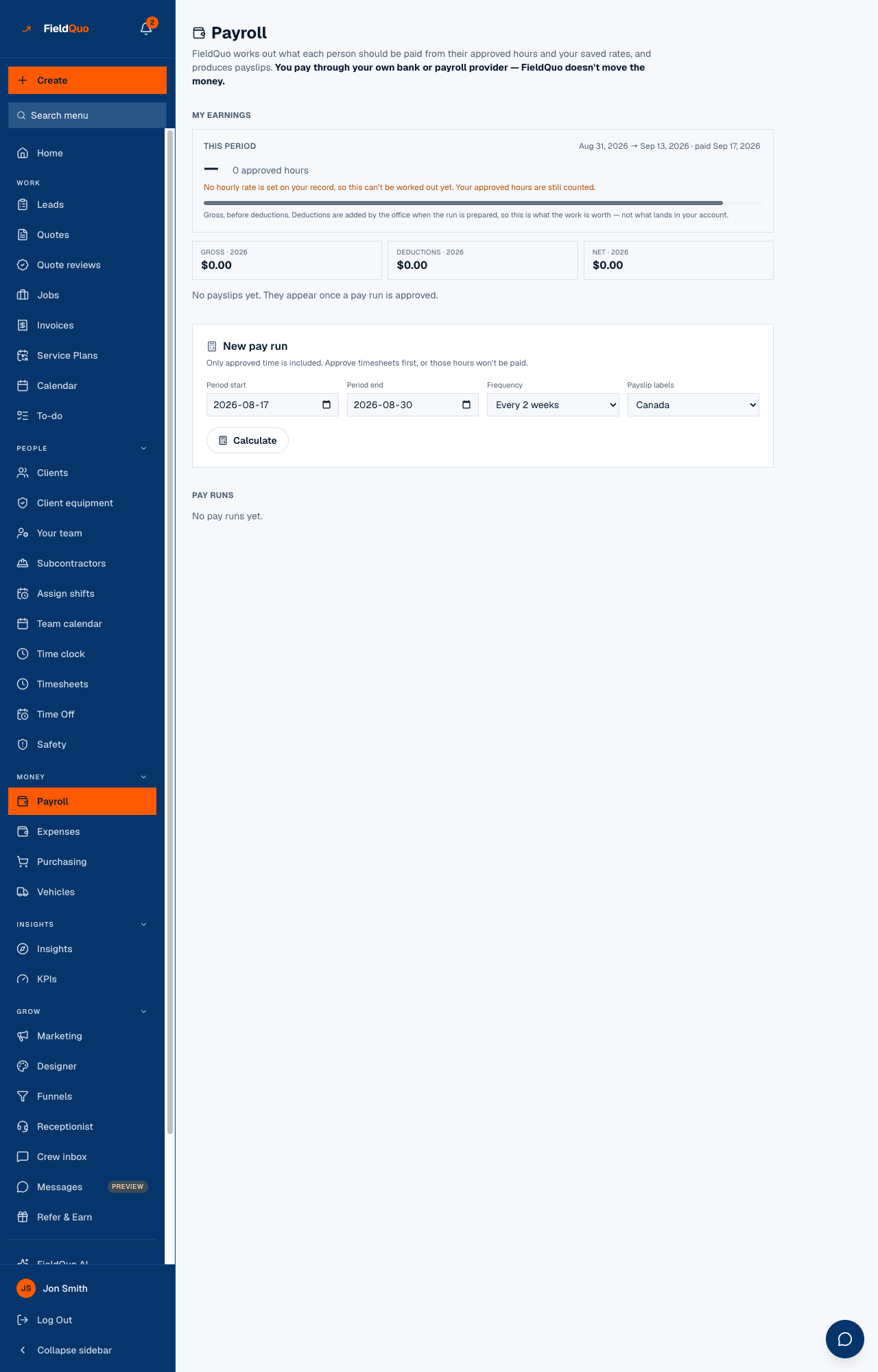
My earnings answers the question a worker opens this screen to ask — what have I earned this period, and what did I get last period — without waiting for the office to run payroll. This period shows approved hours × the hourly rate as a gross figure, the period's dates and payday, and a progress bar. Under it, three tiles for the year: Gross, Deductions, Net.
The list below is one row per approved or paid run: the period, the hours (“80h regular · 6h overtime”), “paid Sep 17, 2026” or “awaiting payment”, the net, the gross minus deductions, and a PDF button. Until a run is approved the list reads “No payslips yet. They appear once a pay run is approved.”
What is on the screen
- This period — “Aug 31, 2026 → Sep 13, 2026 · paid Sep 17, 2026”, then “80 approved hours × $32.00/hr” or, with no rate on record, “No hourly rate is set on your record, so this can't be worked out yet. Your approved hours are still counted.” Hours still pending are counted separately: “6 more hours logged and waiting on your manager to approve — not counted above.”
- Gross · 2026, Deductions · 2026, Net · 2026 — the year to date across approved and paid runs.
- The payslip rows — period, hours, payment state and net, newest first.
- PDF — downloads that payslip. The link is resolved from your own worker record, never from anything in the address bar.
How to download a payslip
- Open Payroll from the sidebar (under Money).
- Under My earnings, find the period and press PDF.
- If you run payroll and need somebody else's, open the run under Pay runs and press Payslip PDF on their line.
What a payslip says
- Your company's name, logo and brand colour in the header, like every other document the company sends, with the person's name, whether they are an employee or a contractor, and the hourly rate where there is one.
- Hours — Regular and Overtime — when the line has any; a salaried line prints none.
- Earnings and deductions in the order they were calculated, then Gross pay and Net pay. Deduction names follow the region chosen for the run (CPP/EI, Social Security/Medicare, PAYE/NI).
- The pay period, and one of “Recorded as paid on …”, “Approved, not yet recorded as paid.” or “Draft — not yet approved.”
- A plain statement that this is a record of what was calculated and paid — not a government form, and no tax has been remitted or filed through this system.
Who can see it
Every access level whose Payroll & Payslips area is above No access sees their own — the presets all start at View their own payslips. View everyone's payslips or View everyone's and run payroll opens every run and every PDF; owners and administrators hold that automatically. Someone set to No access sees no My earnings section at all.
The server resolves “own” from the signed-in person's worker record. A payslip link copied from somebody else's browser opens nothing.
Frequently asked questions
Why is my payslip missing for the last two weeks?
The run is still a draft, or it has not been created. Payslips appear once the run is approved; This period shows the gross so far in the meantime.
Is this a T4, W-2 or P60?
No. The PDF says so in its footer. It is a record of what was calculated and paid; year-end forms come from your accountant or payroll provider.
Why does This period show gross and my payslip shows less?
This period is before deductions — “this is what the work is worth — not what lands in your account.” Deductions are applied when the office runs the period.
Was this helpful?