

Services & Pricing
Switch on the quote types you offer, set what each one charges by, customise the rate card and the wording a client reads for each trade, and add your own quote types.
Settings → Services & pricing → Services & Pricing decides what your company sells and at what rate. Each quote type you switch on here becomes a choice when someone starts a new quote; its rate card builds the quote's core lines; its wording is what the client reads above the prices.
The rates on this screen never leave it. The public self-quote and booking endpoints return your services and their intake questions, never a price — so the list a competitor can see is the list of what you do, not what you charge.
What is on the screen
At the top right, Add custom quote type. Then a Search services box and, if your industry narrows the list, + Show other trades’ services to see the whole catalogue. Below, one card per quote type with a checkbox to switch it on. A type you created yourself carries a Custom badge and lists its intake fields (or No fields — flat rate only).
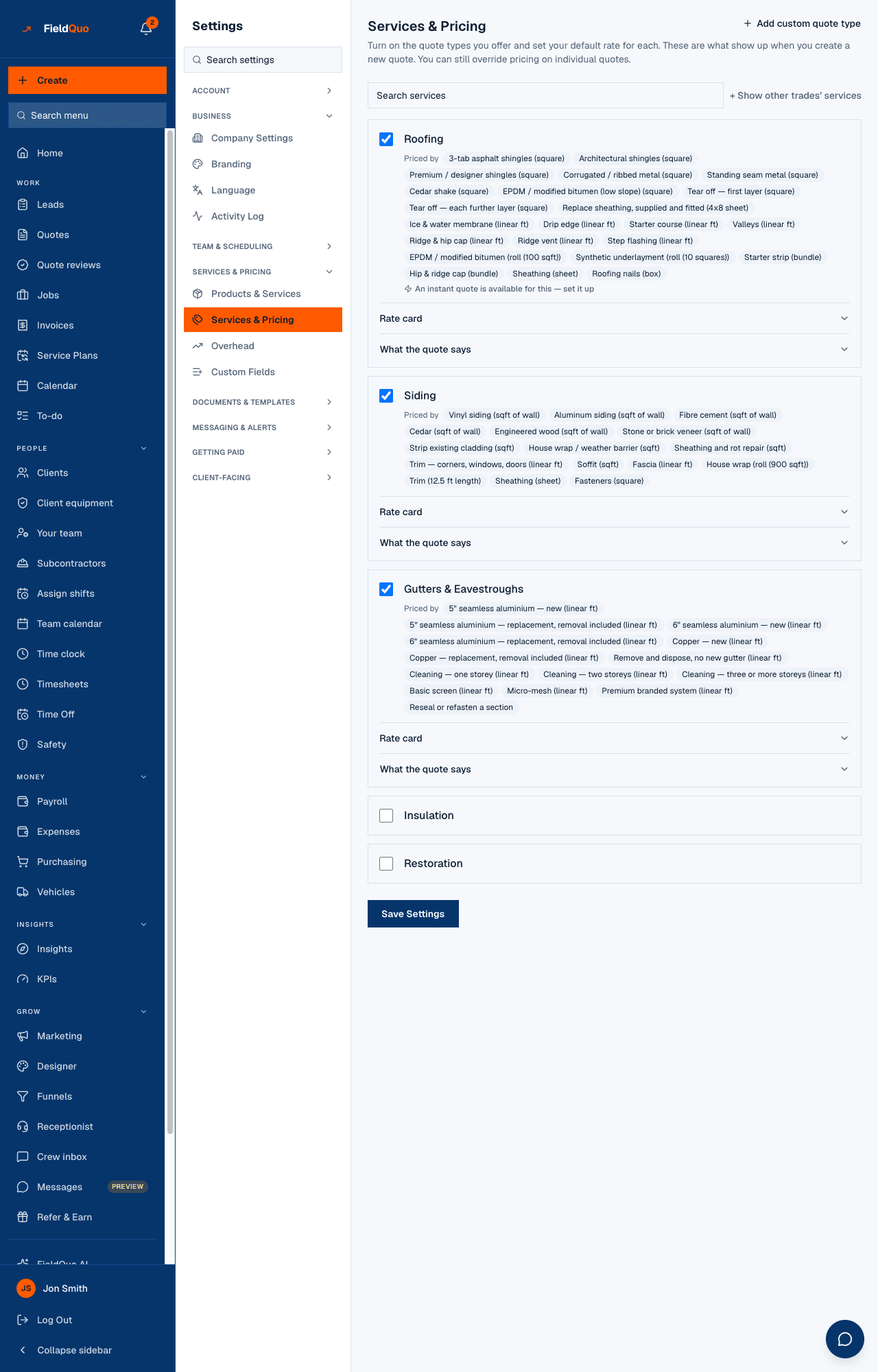
A switched-on trade with a built-in price book shows Priced by chips (per door, per drawer front, per sq ft), and, where it applies, Rates change with the complexity picked on the quote with the complexity levels. A trade with no price book shows a plain Rate box and a per unit instead. Some trades also show An instant quote is available for this — set it up or Homeowners can get an instant price for this, linking to Instant Quotes, and a button Add standard items to Products & Services.
How to switch a trade on and set its rates
- Tick the checkbox on the trade's card.
- For a one-number trade, type the Rate and the per unit. The grey number already in the box is FieldQuo's default; leaving it blank keeps inheriting that default.
- For a trade with a price book, open Rate card and change only the fields you price differently. A changed field is highlighted; Reset to the default puts it back to inheriting.
- Press Save Settings at the bottom. Every card on the page is saved together.
Fields marked internal in a rate card are never printed for the client — a job minimum, an uplift — they only move the numbers. Blank means inherit, never zero: clearing a field returns it to the built-in default, which keeps improving over time; typing the default's value in pins you to today's number.
What the quote says
Under each switched-on trade, What the quote says holds the wording your quotes and PDFs carry for it: What this service is (one paragraph printed above the prices), What’s included (one line per item, Add a line) and How the job runs (steps with an optional timeline, Add a step). Leave it alone and you inherit FieldQuo's default wording for the trade; clear a field to go back to inheriting.
Anything still in [square brackets] in the default is held back from your quotes until you fill it in — a client never sees a bracket — and the panel names what is being withheld. The same wording is what the quote email prints; see Quote Email.
Adding a custom quote type
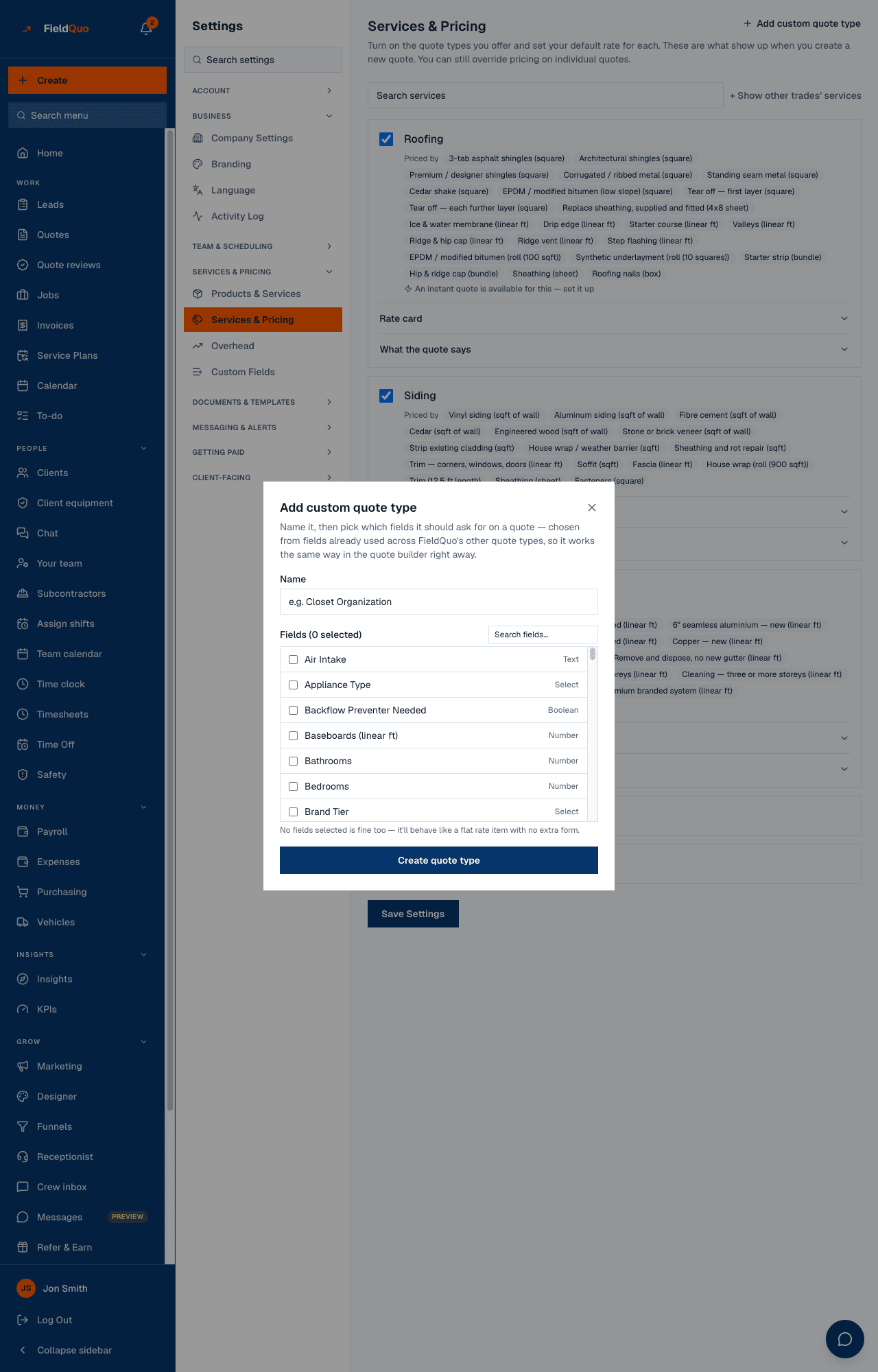
- Press Add custom quote type.
- Name it (e.g. Closet Organization) and tick the fields it should ask for on a quote, chosen from the fields FieldQuo's other quote types already use — search them with Search fields....
- Press Create quote type. It is created straight away, switched on, and behaves like a flat-rate item if you picked no fields.
Who can see it
The row is shown to members with showPricing on their access grid — Estimator, Dispatcher, Manager, owner, admin. Anyone else who reaches the page sees the list with the rates withheld and the notice Pricing is hidden by your access level. Ask an owner or admin if you need to see it. Saving, creating a custom type and seeding standard items are refused for everyone but an owner or admin.
Frequently asked questions
I changed a rate — do my sent quotes change?
No. A quote is priced when it is built. New quotes use the new rate; existing ones keep theirs.
Why is there no flat / hourly / per-unit choice any more?
It was a setting nothing read, so it was removed. A trade with a price book states its own basis; one without is a rate plus a unit, both of which are used when a line is seeded.
Can a homeowner see these rates?
No. The public endpoints return services and intake fields, never prices.
Was this helpful?