

Only in FieldQuo
WhatsApp Business messages
Your own WhatsApp Business number answered in the same inbox as Facebook and Instagram, with the 24-hour rule WhatsApp itself enforces — coming soon: built, and waiting on Meta's approval before any company can connect a number.
Today the WhatsApp Business card on Settings → Meta Ads reads WhatsApp is coming soon. We're waiting on Meta to approve FieldQuo for WhatsApp, and we'll tell you the day it's ready. — with no button (see WhatsApp (coming soon)). This article is how it works once Meta says yes: your WhatsApp Business number is connected through Meta's own sign-up, and from then on every message a client sends to that number lands in Messages under the WhatsApp chip, beside Facebook and Instagram. Photos, videos, voice messages, documents, stickers, contact cards and map pins all arrive; photos, videos, documents and your own address can be sent back.
One rule will surprise anybody who has only used WhatsApp on a phone: on a business number, WhatsApp refuses a typed message more than 24 hours after the client last wrote. FieldQuo says which case you are in on every conversation and offers the way through — a template Meta approved in advance — rather than letting the send fail after you pressed the button.
Overview
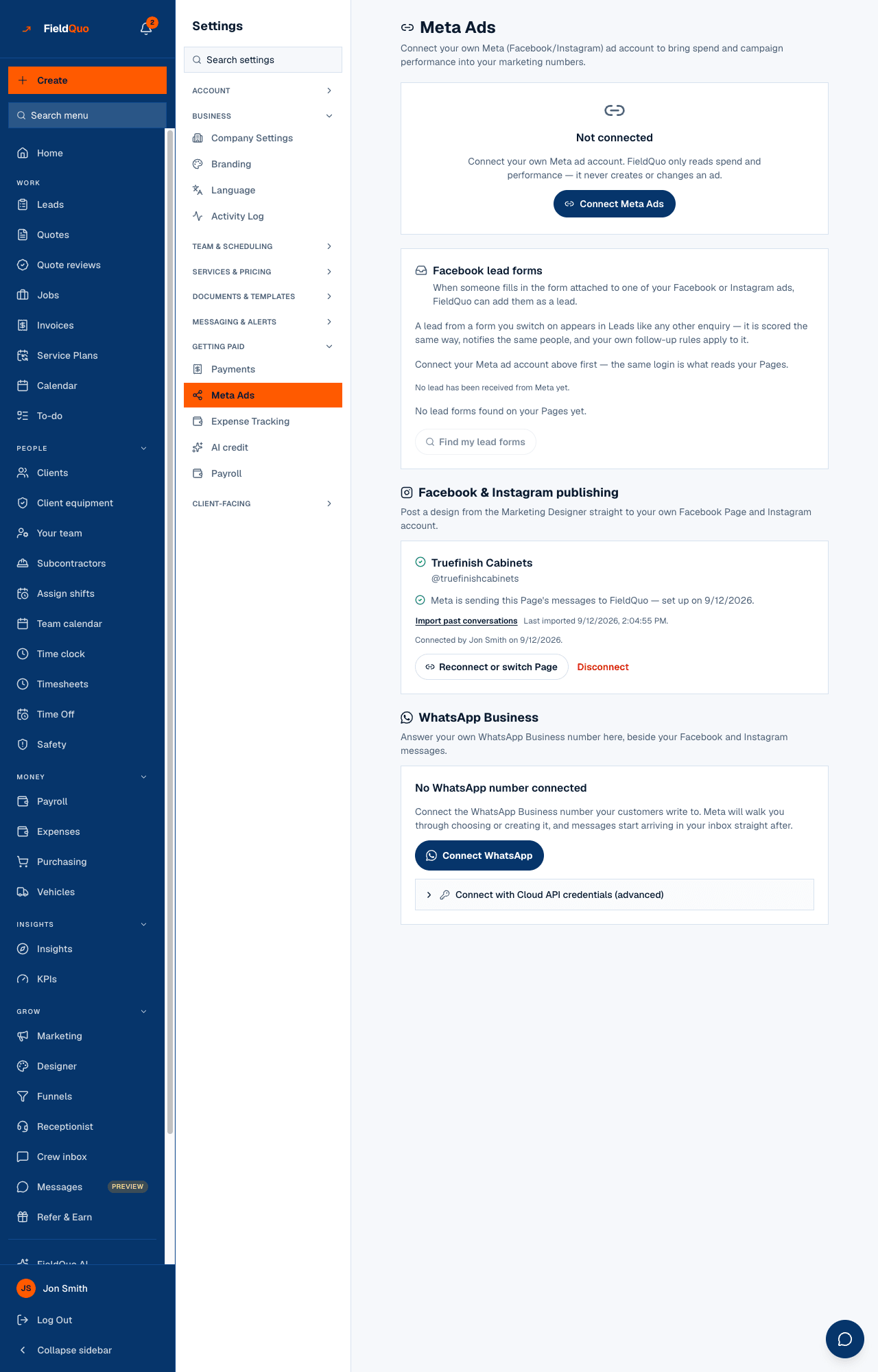
Connecting another business's WhatsApp number needs Meta to grant FieldQuo Advanced Access to its two WhatsApp permissions — sending messages and managing WhatsApp Business accounts — through Meta's App Review. Until it does, your company sees only the coming-soon sentence, followed by Your Facebook and Instagram messages already come in here. (or just the one you have connected). There is no button, and a typed address cannot start the flow either — the server refuses it. The day Meta approves, the card reads No WhatsApp number connected with Connect WhatsApp.
A collapsed Connect with Cloud API credentials (advanced) section, labelled Visible to FieldQuo staff only — for testing and Meta's review, is drawn only for FieldQuo's own staff, and stays that way after Meta approves. Your company never sees it; the sign-up button is the door Meta wants a business to go through.
How you will connect your number
- Once Meta has approved FieldQuo, open Settings → Meta Ads and scroll to WhatsApp Business.
- Press Connect WhatsApp. Meta walks you through signing in, choosing or creating a WhatsApp Business Account, and picking the phone number your clients write to.
- Back on the card, the number appears with its verified name, Connected via Meta sign-up, and the phone number as Meta prints it. Messages start arriving in the inbox straight after.
- Press Refresh templates to read your message templates from Meta. The card lists each with its language and Meta's own status — APPROVED, or whatever Meta says.
A number that cannot receive is worse than none, so if FieldQuo cannot subscribe to the number's messages nothing is connected and the card says so: FieldQuo couldn't subscribe to your messages, so nothing was connected. Try again.
The 24-hour rule
The card states it where you connect: WhatsApp only carries a typed message for 24 hours after the customer last wrote to you. After that you can still reach them, but only with a template Meta approved in advance. The window restarts every time the client writes again. FieldQuo computes it before you type, so the composer changes shape instead of failing after Send.
| What the conversation shows | What you can send |
|---|---|
| Nothing — the window is open | Anything: text, a photo, a video, a document, your address |
| Less than an hour left to reply. | Anything, for now — answer before it closes |
| More than 24 hours have passed since they last wrote, so WhatsApp won't carry a typed message. | An Approved template from the picker that replaces the typing box, with its fill-in values |
| They haven't messaged you on WhatsApp yet… | Only an approved template can start a conversation |
A send that breaks the rule anyway — a clock disagreement, a message FieldQuo never received — is refused by WhatsApp and shows in the thread as a failed reply with the reason, and the row shows Not delivered.
Templates
Templates are written and submitted in Meta's WhatsApp Manager, not in FieldQuo. FieldQuo reads them with Refresh templates, offers only the ones Meta marked APPROVED, and sends by template id with your fill-in values — never the template's words retyped, so an approved template cannot be used as an envelope for something else. A rejected template stays on the list with its status, because “rejected” is the fact you need.
With no approved template the picker reads You have no approved WhatsApp templates yet. Create one in Meta's WhatsApp Manager, then refresh the list in Settings. Write one before you need it — a client who wrote on Friday and is answered on Monday is outside the window.
Photos, files and your address
- Attach a file — WhatsApp only, on the Reply side. JPEG or PNG photos up to 5 MB (a larger phone photo up to 25 MB is shrunk to fit), MP4 or 3GP video up to 16 MB, and PDF, Word, Excel, PowerPoint or plain-text documents up to 100 MB. The typing box becomes Add a caption (optional).
- Send our address — your company's own pin, drawn only when your company address was picked from the map and so has coordinates. A location goes on its own; WhatsApp carries no words with it, and the box says so.
- Voice notes, stickers and contact cards arrive here but can't be sent yet. A contact card a client shares offers Add as a client; a map pin offers Save as Sam's address on a linked client.
- Facebook and Instagram replies carry text only; the paperclip is not drawn there.
What the other tools do not do
None of the competitor pricing pages FieldQuo's comparison pages record lists WhatsApp at any tier. FieldQuo's own pages do not list it yet either, deliberately, until Meta approves the permission — and whatever copy that becomes will carry the 24-hour sentence above, because a page promising “message your customers on WhatsApp” without it promises something WhatsApp does not allow.
Who can see it
Connecting and disconnecting a number, and refreshing templates, live on Settings → Meta Ads — owner and administrators only. Reading and answering the conversations follows the inbox's rule: Requests at view only to read, view, create and edit to reply. See The Messages inbox.
Frequently asked questions
Can I use my personal WhatsApp number?
Only as a WhatsApp Business number chosen or created in Meta's sign-up. FieldQuo never reads a personal account.
Why can I only send a template?
More than 24 hours have passed since the client last wrote, or they have never written to you on WhatsApp. WhatsApp refuses typed text in both cases; the template picker is the way through.
Does disconnecting delete the conversations?
No. The number is stamped as disconnected and stops receiving; what is already in the inbox stays.
Was this helpful?