

Only in FieldQuo
Instant quotes on your website
Turn a trade on, set your rates and choose whether the homeowner sees a range — every estimate lands in Estimate Reviews, and your rate card never leaves the building.
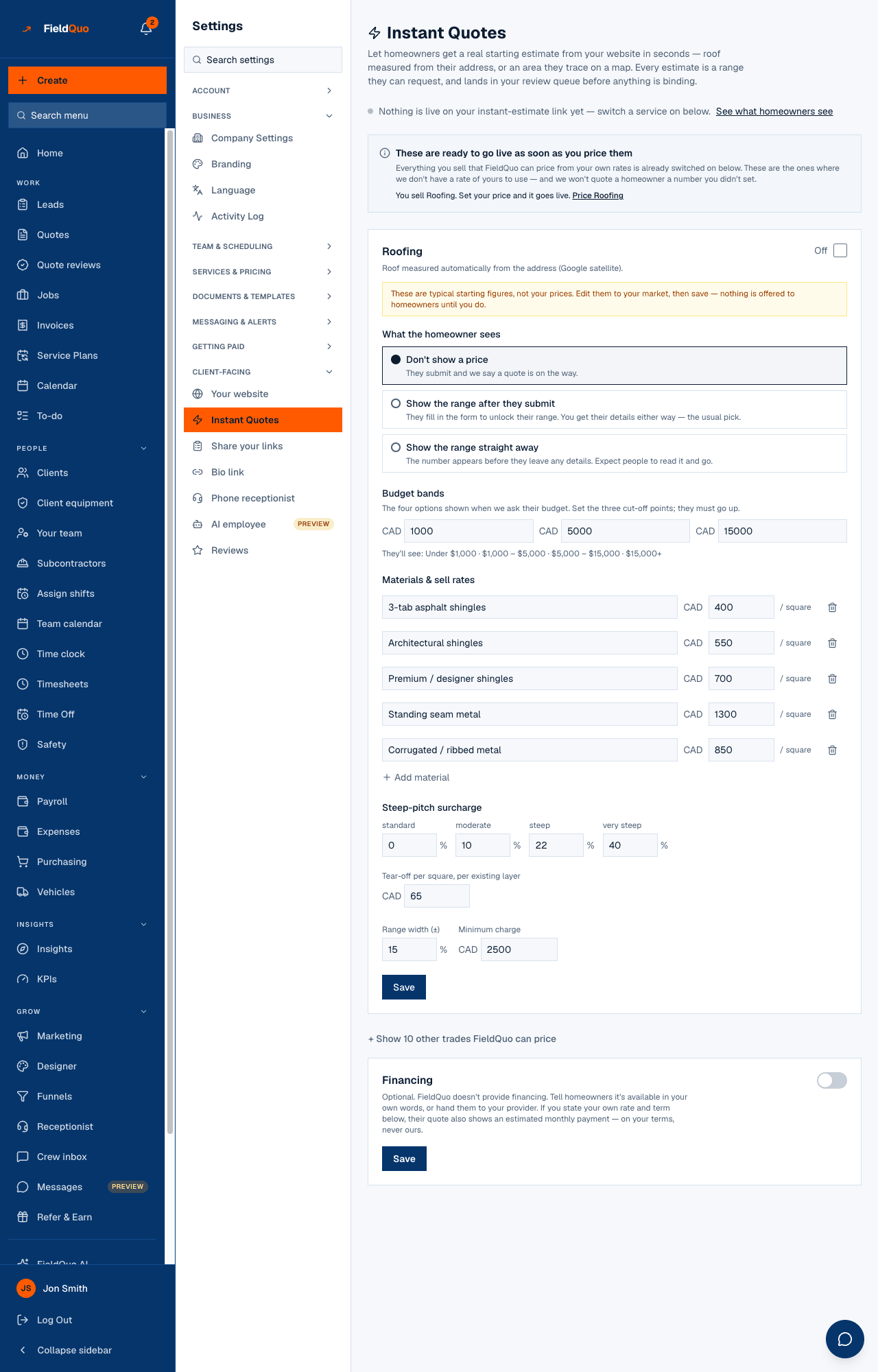
Settings → Instant Quotes lets a homeowner get a real starting estimate from your website in seconds: a roof measured from their address, a lawn they trace on a map, or a few numbers they type in. The price is computed on the server from rates you set, shown as a range, and lands as a draft in your review queue before anything is binding.
This article is the settings side. What the homeowner sees is in The instant estimate page, and the review is in Estimate Reviews.
Overview
The screen opens with a live count — {count} live on your instant-estimate link, or a note that nothing is live yet — and a link to See what homeowners see. Once at least one trade is live, an embed snippet appears under Put the instant estimate on your website; it is an ordinary HTML element that works on Wix, Squarespace, WordPress and hand-written pages.
Below that is one card per trade FieldQuo can price instantly, an On / Off switch on each, and a Financing card at the end. Only trades that are also switched on under Settings → Services are offered; the rest sit under Show other trades FieldQuo can price.
Only in FieldQuo. An instant, server-priced estimate from your own rate card with a mandatory review before it becomes a quote is not listed on the pricing pages of Jobber, Housecall Pro, Projul or ServiceTitan at any tier.
The trades, and how each one measures
| Trade | How the homeowner is measured |
|---|---|
| Roofing | Roof measured automatically from the address (Google satellite): sloped area, pitch, squares. |
| Lawn mowing | The homeowner traces the lawn on a satellite map; the area comes from the outline. |
| Epoxy floors, parging, flooring, painting, countertops | The homeowner enters the area and picks options. |
| Cabinet refinishing and refacing | The homeowner enters counts — doors and drawer fronts. |
| Stairs | The homeowner enters the number of steps and picks the build; priced per tread. |
| Junk removal | The homeowner picks the items to remove; priced by volume with a built-in load discount. |
How to put a trade live
- Open Settings → Instant Quotes and find the trade's card.
- Edit the rate fields to your market. The starting figures are typical numbers, not your prices, and nothing is offered to homeowners until you save.
- Choose What the homeowner sees (below).
- Set Minimum charge and Range width (±) — the range is the computed price plus and minus this percentage.
- Press Save & enable. The live count at the top goes up by one.
A card can be On and still not live: if a rate the pricer needs is missing, the card says homeowners can't get a price for this yet. That sentence is shown only to you — a homeowner is never told why a rate card is incomplete.
What each setting changes
- Don't show a price — the homeowner submits and is told a quote is on the way. No number is shown on the page or in their confirmation email. This is the default.
- Show the range after they submit — the range is unlocked by filling in the form, so you get their details either way. The usual pick.
- Show the range straight away — the number appears before they leave any details. Expect people to read it and go.
- Budget bands — the four options shown when the form asks their budget; set the three cut-off points in increasing order, or the standard bands are used.
- Use my services pricing — appears when your Services & Pricing rates have changed since the card was saved; it adopts them here.
- Financing — optional, and FieldQuo does not provide financing. Your own wording, or a provider link. If you state both an annual rate and a term, the estimate also shows an estimated monthly payment on those terms; leave either blank and no monthly figure is ever shown.
Whatever the visibility, the public page never shows the rate card — only a finished range, and only when you chose to show it. The public endpoint returns services and fields, never rates. That is a rule of the product, not a setting.
Who can see and change it
The screen is a rate card, so it is shown to anyone with See prices on their access — an Estimator included; Crew does not see it. Saving rates, visibility or financing is for owners and administrators only; everyone else sees the page read-only with the note that only an owner or admin can edit pricing.
Frequently asked questions
Where does an estimate go?
A client record is matched or created, a draft quote is written with the review flag on, and it appears in Estimate Reviews. The homeowner gets a confirmation email in your name, with the range only if you chose to show it.
Can the homeowner book a visit from the estimate?
Yes, when your booking page is set up — the confirmation offers a visit against your real availability.
Does the instant estimate share a link with the self-quote form?
No. They are two cards on Settings → Share your links: Instant estimate prices; Request a quote does not. See The self-quote form.
Was this helpful?