

Tasks
The internal to-do list — chase a deposit, order material, call a client back — sorted by what will hurt most if you leave it, with tasks FieldQuo raises for you at the moments something is owed.
Tasks are internal reminders for you and your team. A job is scheduled work at a client's address; a task is the office admin around it — the follow-up call, the order to place, the review to ask for. The To-do row in the sidebar opens the list.
The list is sorted by urgency rather than grouped by status, because the question people open it with is “what have I let slip”. Overdue tasks sit at the top whatever their priority; a low-priority task two weeks late still needs a decision.
What is on the screen
The heading Tasks, a line saying what tasks are, and a count of open tasks. Then one row per task: a tick, the title, a priority chip (High, Urgent or Low — Normal shows no chip), a red overdue badge when the due date has passed, the description, the Due date, who it is assigned to, the client, and a link to the job it belongs to. A task that must have photos shows 0/3 photos; one that must have a comment shows Needs a comment.
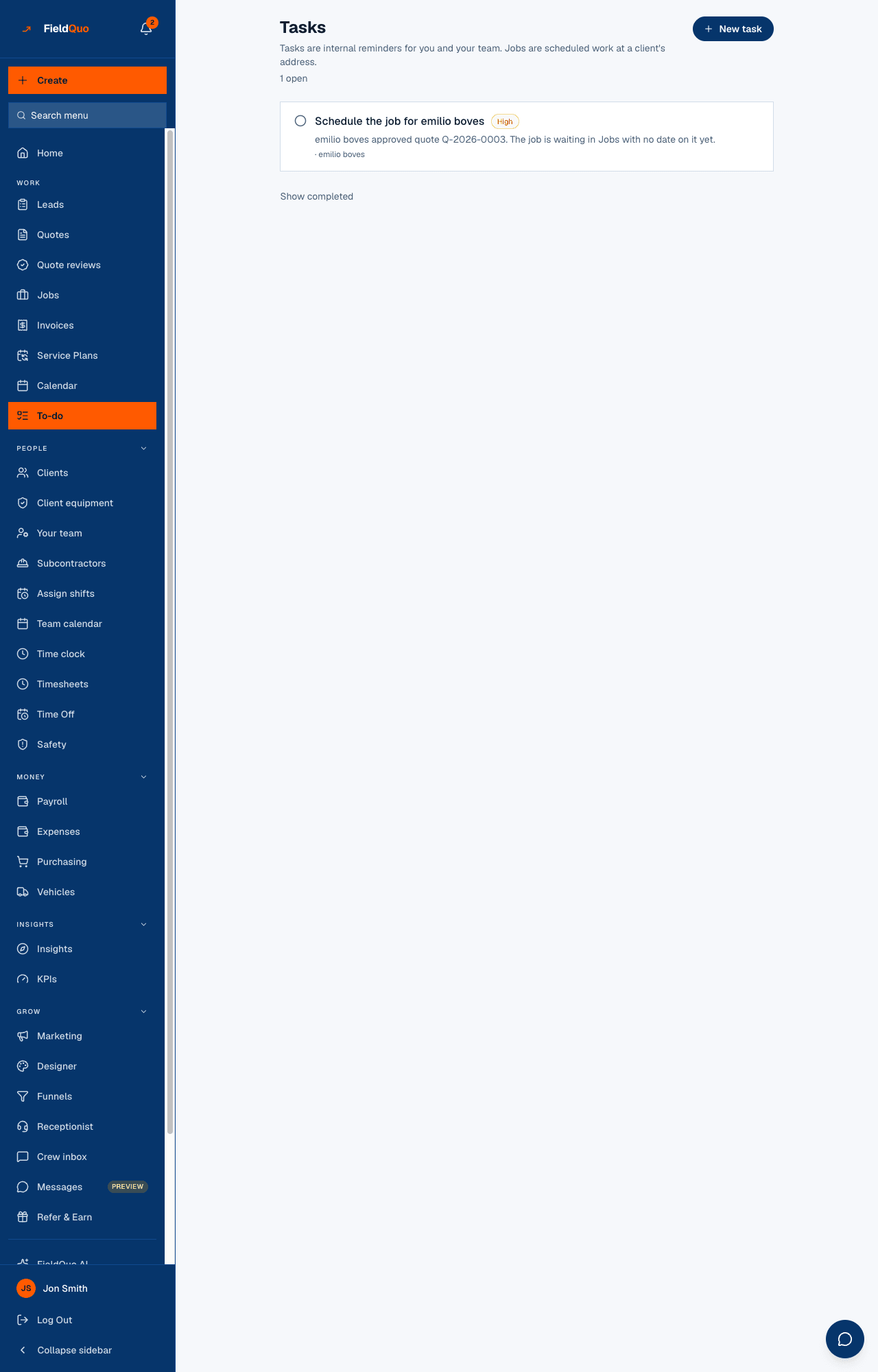
Show completed at the bottom reveals finished and cancelled tasks; Hide completed puts them away again. Ticking a finished task reopens it.
How to add a task
- Press New task.
- Type What needs doing? and, if it helps, Any detail worth keeping (optional).
- Set Due, Priority (Low, Normal, High, Urgent) and Assign to — Nobody leaves it for anyone to pick up.
- Link to a job (optional). Once a job is picked, two more controls appear: Requires photos (a count, up to 20) and Requires a comment.
- Press Add task.
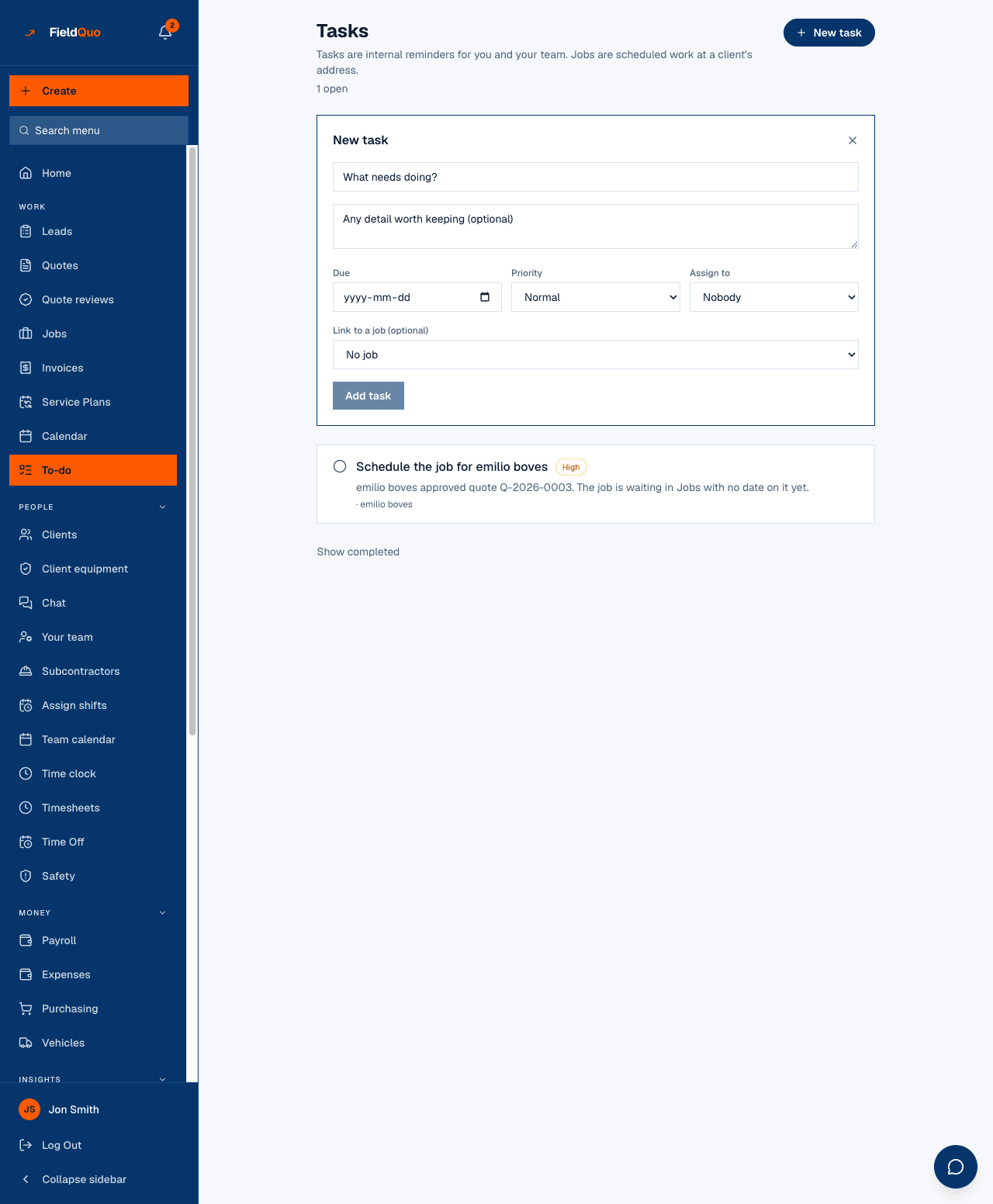
A photo requirement is only offered once a job is linked, because the photos are filed against that job. The tick on such a task refuses until the photos and the comment exist; you add them from the To-dos on this job panel on the job page (Add a photo, Comment, Mark done), not from this list.
Tasks FieldQuo creates for you
Four moments in the pipeline leave somebody owing an action, and FieldQuo writes the task itself — once per event, never twice:
| When | The task | Priority and due date |
|---|---|---|
| A client approves a quote | Schedule the job for {client} | High, no due date |
| An invoice is sent | Follow up payment for {invoice number} | Due in 7 days; resolved by itself when the invoice is paid |
| A job has materials to buy | Buy materials — {job} · 3 of 10 bought | High; the count updates as you tick items off, and it closes when everything is bought |
| A job is marked Completed | Ask {client} for a review, and Review what “{job}” actually cost | Due in 2 days and 3 days |
Each of these links to its job and client. A job entered as a past job raises neither of the two completion tasks.
Who can see what
- New task appears for owners, administrators and the Dispatcher and Manager presets. Assigning a task to somebody else needs the same level.
- Crew and Estimators see the tasks assigned to them, the ones they created and the unassigned ones — and can tick those. They cannot create a task from this screen.
- There is no delete control on this screen. A task is ticked done or left open.
Frequently asked questions
Where do tasks show on the job?
Under To-dos on this job on the job page, with a Mark done button, the photo upload and the comment box where the task requires them.
Can the job's notes suggest tasks?
Yes — the Tasks from the notes panel on the job page reads the client, quote and visit notes and proposes tasks you pick from. See Suggested tasks.
Why is a task I ticked still open?
It requires photos or a comment that are not there yet. The badge on the row says which; add them on the job page.
Was this helpful?