

Arrival windows and travel buffer
Three settings on the Booking Page that decide which times a client can book and what they are told: the travel check, the buffer between jobs, and the arrival window.
A booking page that sells 5:00 across town and 5:30 on the other side is the worst failure a contractor can have, because the homeowner standing in a driveway at 5:45 has already decided what kind of outfit you are. Two of the settings in this article stop that: the travel check hides times you cannot reach, and the buffer adds the minutes the drive does not include.
The third changes only what the client is told. An exact time is a promise the road breaks; a window — “between 1:45 and 2:15 PM” — is one you can keep.
Overview
All three live on Settings → Booking Page, and all three apply only to visits at the client's place — they are hidden entirely when Visit their place is not one of your meeting modes. They act on the public booking page, the client's confirmation and the client's manage-my-visit link. Your own calendar always keeps the exact time.
What is on the screen
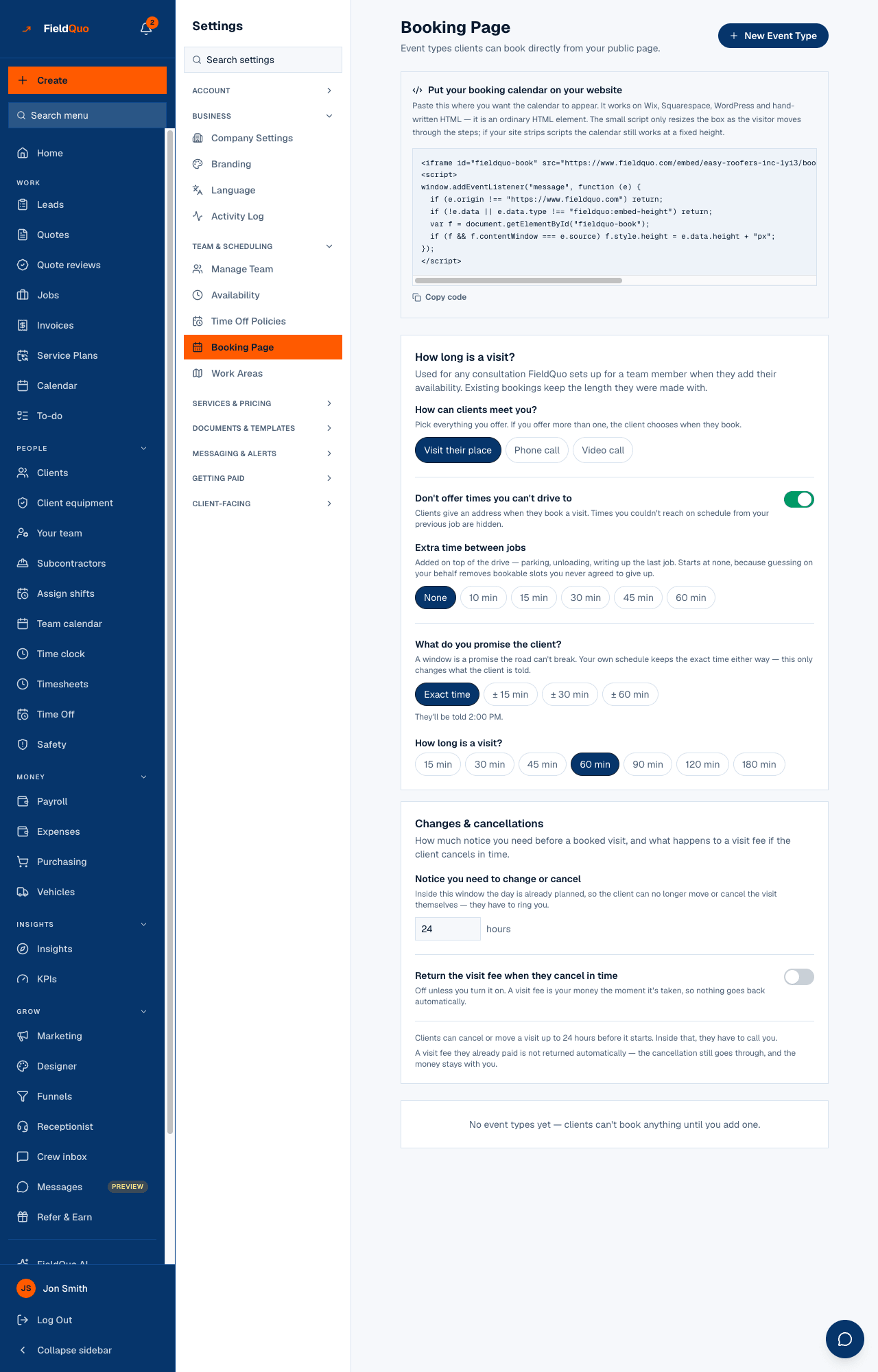
Under How long is a visit? you find How can clients meet you? (Visit their place, Phone call, Video call), then Don't offer times you can't drive to with its switch, Extra time between jobs (None, 10 min to 60 min), What do you promise the client? (Exact time, ± 15 min, ± 30 min, ± 60 min) with a one-line preview, and the default visit length.
The travel check
With Don't offer times you can't drive to on, a client who types an address is shown only the slots you could reach from your previous appointment: the earlier appointment's end, plus the drive, plus the buffer, must fit before the slot starts. The drive is Google's driving time when FieldQuo has coordinates for both ends and a key, and a straight-line estimate otherwise.
- Open Settings → Booking Page and make sure Visit their place is selected.
- Turn on Don't offer times you can't drive to. It is on unless you switched it off.
- Pick a chip under Extra time between jobs if the drive alone is never enough.
The check refuses to guess. When it does not know the drive — no coordinates on one end, the map service down — it hides nothing rather than inventing a travel time, because a silently missing slot is worse than one that needs a phone call. Switched off, every free slot is offered.
Extra time between jobs
The buffer is added on top of the drive — parking, unloading, writing up the last job. It starts at None, because a number guessed on your behalf removes bookable slots you never agreed to give up. It only exists while the travel check is on; switch that off and the buffer chips disappear with it.
The arrival window
Under What do you promise the client?, Exact time tells them “2:00 PM”; the ± chips widen it either side. The window is capped at two hours in total, and the preview under the chips shows the exact sentence the client would read.
| Chip | What the client is told for a 2:00 PM slot |
|---|---|
| Exact time | They'll be told 2:00 PM. |
| ± 15 min | between 1:45 and 2:15 PM |
| ± 30 min | between 1:30 and 2:30 PM |
| ± 60 min | between 1:00 and 3:00 PM |
Only the client sees the window. The crew's calendar, the team schedule and the office copy of every email keep the exact time — an estimator told “between 1:45 and 2:15” cannot plan a day. The window is never applied to a phone or video call.
Where each setting shows up
- The travel check and the buffer: the slots offered on your booking page, and the slots offered when a client moves a visit through their own link.
- The arrival window: the client's booking confirmation email, the client's manage-my-visit page, and the client's copy of the “your visit has moved” email.
- Not in the appointment reminder text, which gives the exact time.
- Not on the calendar, the job page or the team schedule.
Who can change it
The Booking Page screen opens for owners, administrators and supervisors — the Dispatcher and Manager presets. Crew and Estimators do not see it; their own bookable hours are on Availability, which stays visible to everyone. See Working hours and bookable hours.
Frequently asked questions
Why is a slot I know is free not offered?
Usually the travel check: from the previous appointment's end, the drive plus the buffer does not fit before that slot. Either the earlier job runs late in the calendar, or the buffer is generous. Turning the check off shows every free slot.
Does the window change my calendar?
No. Your calendar keeps the exact time; only the client's confirmation and manage page show the window.
Is the drive time exact?
With coordinates on both ends and Google available, it is Google's driving time. Otherwise it is a straight-line estimate with a road factor, and FieldQuo says “about” when that is all it has.
Was this helpful?