

AI credit and phone credit
The two prepaid balances FieldQuo meters — phone minutes and number rent on one, AI images and the deep photo read on the other — what each costs, how to buy more, and how automatic top-up works.
Your plan includes FieldQuo AI and the copilot. Two things are metered separately, against credit you buy in advance: the phone receptionist (and crew texting), and AI images (generation, and the paid deep read of a quote's photos). They draw two different balances, kept apart on purpose, and both are shown on Settings → AI credit.
Credit is bought from FieldQuo through Stripe in US dollars, whatever currency your plan bills in. A top-up never expires. A monthly AI credit plan's credit resets each month — what is left on the renewal date is gone and the next month's lands. Neither is ever refunded, including when you cancel the plan.
Overview
AI credit is one screen with three cards: Phone credit (balance, a link to buy more, and Where the credit went), AI image credit (balance, an Add credit row of one-off amounts, and its own statement), and AI credit plan — pay monthly, save per credit (a recurring allowance on the AI balance). Buying phone credit and setting up automatic top-up live on the Phone receptionist settings page, which the first card links to.
The two balances do not mix. Phone credit cannot be spent on images and image credit cannot be spent on calls. The screen says so under its title, so nobody buys the wrong one.
What is on the screen
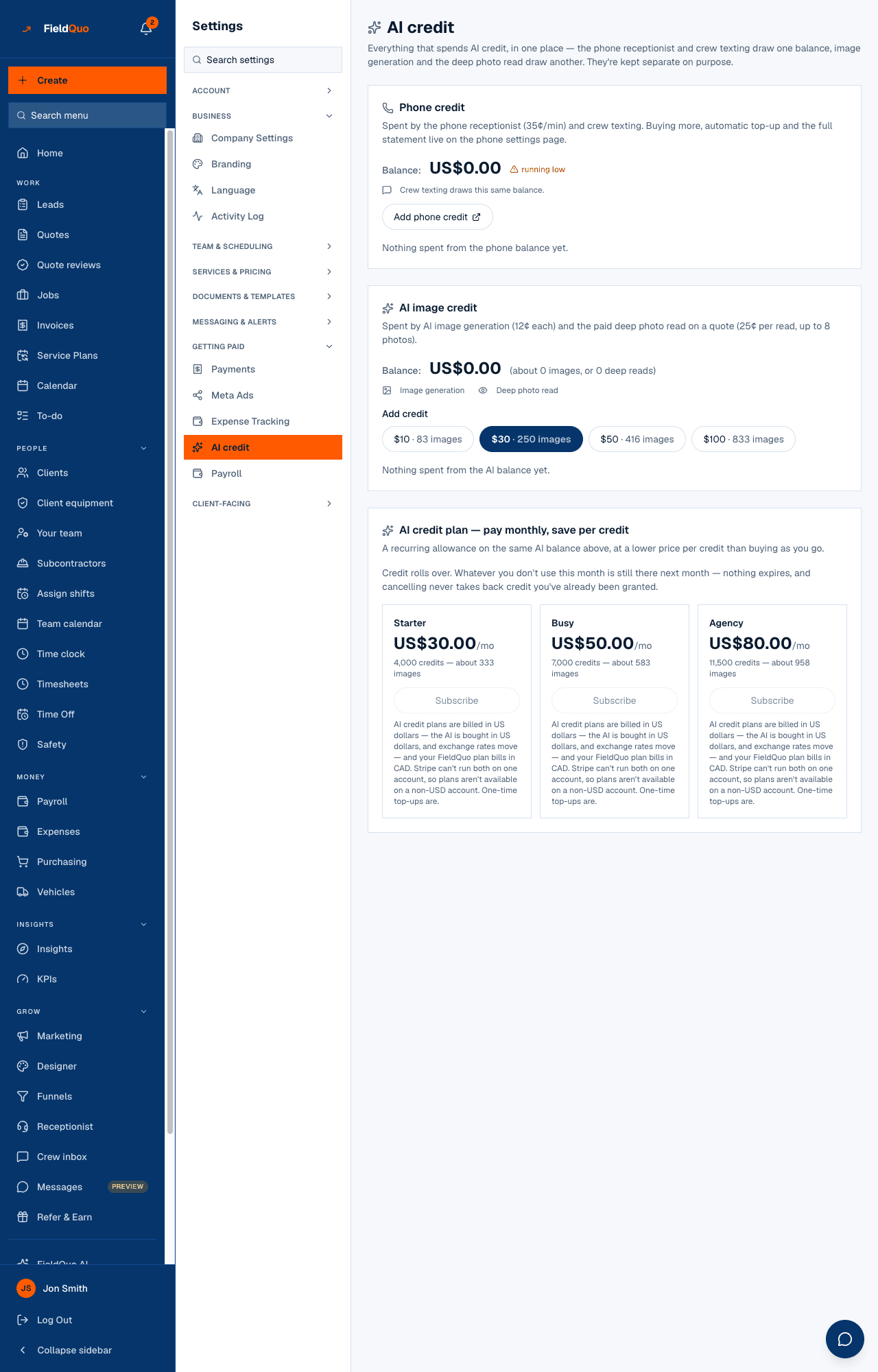
- Phone credit — the balance, a running low flag when fewer than ten minutes remain, the note that crew texting draws this same balance, Add phone credit (which opens the phone settings page), and the statement.
- AI image credit — the balance with what it buys in brackets (about N images, or N deep reads), the two things that spend it, Add credit with four amounts, and the statement.
- AI credit plan — the reset rule in plain words (plan credit resets monthly, top-ups don't expire), how much plan credit is left and the date it resets, then either the three plans with Subscribe, or the plan you are on, its renewal date, and Cancel plan.
- Which plan fits the AI you'll use? — type roughly how many AI employee conversations, drawing sets and AI quote reviews you expect a month. It names the AI credit plan that covers the conversations and drawing reads (they are paid from AI credit, whatever your FieldQuo plan) and says how many quote reviews your plan's AI allowance covers (they come out of the plan). Each AI credit plan also says about how many conversations or drawing reads it buys. Every allowance is capped; the figures are estimates at today's prices. The same box is under the plans on Account & Billing, where each plan says about how many quote reviews it covers, and on the public pricing page.
What each thing costs
| Item | Cost | Balance it draws |
|---|---|---|
| Receptionist call | 35¢ a minute, rounded up, one minute minimum | Phone credit |
| Local number rent | $4 a month | Phone credit |
| Toll-free number rent | $9 a month, plus 5¢ a minute on calls | Phone credit |
| Crew texting line | $4 a month | Phone credit |
| AI image generation | 12¢ an image | AI image credit |
| Deep photo read on a quote | 25¢ a read, up to 8 photos | AI image credit |
The first phone number comes with 30 free minutes, once per company. A number whose rent the credit cannot cover gets 7 days' notice and is then released for good — see Phone receptionist.
Buying credit
- For phone credit, open Settings → Phone receptionist and press Add credit in the Credit card. Pick $10, $30, $50 or $100 — each shows the minutes it buys — or enter any amount from $5 to $1,000. Stripe's checkout opens; the credit lands on your balance when you return, or within a minute or two through Stripe's own confirmation if you closed the tab.
- For AI image credit, press one of the four Add credit amounts on Settings → AI credit — the same $10 / $30 / $50 / $100, each labelled with the images it buys — and pay on Stripe's page the same way.
- For a monthly allowance, press Subscribe on one of the three AI credit plans. The first month's credit is on your balance when you return; each later month's is added when that month's invoice is paid.
- starter — $30 a month for 4,000 credits (about 333 images).
- busy — $50 a month for 7,000 credits (about 583 images).
- agency — $80 a month for 11,500 credits (about 958 images).
One credit is one cent of pay-as-you-go value, so a generation is 12 credits and a deep read 25. Plan credit resets every month: whatever is left on the renewal date is gone, and the next month's credit lands. A plan's credit is always spent before a top-up, so a top-up is never the part that resets — top-ups stay until you use them. Cancelling stops next month's charge and next month's credit; the month already paid for keeps its credit until its reset date. The plans are billed in US dollars for every company — the AI behind them is bought in US dollars. A company whose FieldQuo plan bills in CAD, AUD, GBP or EUR subscribes on a separate US-dollar billing record kept for add-ons, so its own plan is untouched, and the card says it is billed in US dollars with an approximate conversion.
Automatic top-up for phone credit
Off unless you turn it on. When it is on, FieldQuo buys more phone credit on its own when the balance drops below a threshold you choose, so the receptionist never stops answering mid-week. It is checked every 15 minutes, buys at most 3 times a day, and waits at least 15 minutes between purchases.
- On Settings → Phone receptionist, find Top up automatically and press Set up automatic top-up.
- Choose Top up when the balance drops below ($5, $10 or $20) and buy this much each time ($10, $30, $50 or $100), read and tick the terms, and press Continue. Stripe saves the card with a proper mandate; the terms you agreed to are recorded with the date.
- The card reads Automatic top-up is on, with the threshold, the card's last four digits, the amount, and the daily maximum. Turn off automatic top-up stops it while keeping the card; Remove the saved card removes it. Changing the threshold or the amount asks you to agree to the terms again.
If the saved card is declined, FieldQuo switches automatic top-up off and does not retry — retrying a declined card is how a card gets blocked. The card on the settings page says so; sort the card out with your bank, then press Turn it back on. Cancelling your FieldQuo plan does not switch automatic top-up off.
Who can see it
The owner, administrators, and anyone on the Dispatcher or Manager preset — the same people who can manage the team. Buying credit, subscribing to a plan and arming automatic top-up are refused on the server for anyone else. An estimator or a crew login never sees the AI credit or Phone receptionist rows.
Frequently asked questions
Why is credit priced in US dollars when my plan is in CAD?
The phone minutes and the AI are bought in US dollars and exchange rates move, so the balances are kept in the currency they cost. Every company can buy both, in US dollars; your bank converts the charge.
Does unused credit expire?
Top-ups don't. A monthly plan's credit does: it resets on the renewal date shown on the AI credit page, and the next month's credit lands. Plan credit is spent first, so a top-up is never what resets. Nothing is refunded, including when you cancel.
Is FieldQuo AI — asking questions about my own quotes and invoices — metered?
No. FieldQuo AI and the copilot are included in every plan. Only phone minutes, number rent, image generation and the deep photo read draw credit.
Where do I see what the credit was spent on?
Under Where the credit went on each card of the AI credit page: every debit and every top-up, dated. The phone page carries the same statement.
Was this helpful?